Showing posts with label technology. Show all posts

Wednesday, November 24, 2010

Playing Games at the Library


Does the weather have you retreating inside to play some video games? What if you could turn that favorite hobby into a research topic? Read on!

Video games have a 50-year history, reaching back to the crazy computer scientists in MIT's Building 20 knocking out walls according to Supercade: a visual history of the video game age. And while we're no longer building bookcase-sized machines to play them, video games are even more popular today than ever before: some online games have 12 million subscribers (That's more people than the entire population of Greece)!
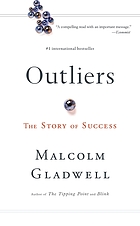
The average gamer will have spent 10,000 hours playing by the time they're 21 years old. According to Michael Gladwell in his book, Outliers, that's roughly the amount we need to become an expert in any field.

So what can all this game playing do? Dr. Jane McGonigal, a theorist and multiplayer game designer, thinks that games might save the world:

Jane McGonigal: Gaming can make a better world | Video on TED.com

I really hope that we can come together to play games that matter, to survive on this planet for another century. And that's my hope that you will join me in making and playing games like this. When I look forward to the next decade,I know two things for sure, that we can make any future we can imagine, and we can play any games we want. So, I say let the world-changing games begin.
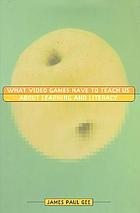

Sound good?

Want to get started on creating games right away?


These books and more are waiting for you at the library- game on!

Monday, September 27, 2010

UCC Library is now loaning iPads!


Starting this fall, we have three iPads available for student use in the library! In order to check one out, you'll need a student ID card with a Fall 2010 sticker.

The iPads come with a number of cool features, including the ability to access and read available ebooks in seconds! Most novels and books in the public domain (published before 1923) are freely down-loadable: this means Shakespeare, Dickens, Mary Shelley, and much, much more are at your fingertips!

If you have any questions or to add ebooks to your iPad on checkout, talk with a librarian.

PS- The cat is not included. :)

Cat/iPad photo from Veronica Belmont

Thursday, May 1, 2008

Favorite Online Tools for Awesome Academics: a short list

Living la vida virtual this term in your classes? Whether you are taking, teaching, building, or just considering online coursework, there is a bewildering selection of tools and tips that can leave even the most techno-saavy user feeling as overwhelmed as an ant in a swimming pool. But with the proper care and feeding, online tools can be a powerful ally in the classroom, whether said room is a traditional one or the type you can attend in your PJs on a Saturday morning.

Here are five of my personal favorite (free!) online tools:

  1. UCC Life
    Yes, it has its issues. But did you know, every single UCC class has its own "course homepage" within UCC Life where links can be posted, documents placed online, and discussions can be held all available from any computer with an internet connection? Even if your class is entirely "on campus," the UCC Life course homepage can provide another place for communication to occur.

    Suggested uses if you're an instructor: By using the "manage" links, you can post assignments or a syllabus, and send out announcements that will automatically appear on your students' front UCC Life pages when they login.

    Suggested uses if you're a student: Even if your instructor is not using every course homepage feature, there will be a link to email your instructor, or to post webpage links if you have a resource to share with the class.

  2. Google Tools
    Have you ever had the frustrating experience of wanting to print out an assignment you've worked on for hours, only to realize the disk was left in your other bag? Never again, with Google Documents. In addition to a very popular search engine, Google offers a variety of online tools that allow you to use a word processing, spreadsheet, and presentation program that will save your documents to your account, and you can access and work with them on any computer with an internet connection. You can also share your document with others, and the changes will be automatically saved so you can always see who made which alterations. The service does require one to sign-in, but account creation is free.

    To learn more, take Google's friendly online tour.

    Suggested uses if you're an instructor: Use a Google Document to track comments and contributions to a shared class product, such as an info page on a class-related topic created by students (like a wiki, you can see all past versions of a Google Doc. in a drop-down menu). Or create an interactive course schedule that you can update and students can view on the web: see an example for LIB 127 (Library & Internet Research).

    Suggested uses if you're a student: Eliminate the sinking feeling that occurs when it is the day a paper is due and you can't remember where your USB drive is-- Save your research paper as a Google document, and have access to it from any computer with an internet connection. Or use the "sharing" ability to work on group projects online.

  3. Del.icio.us
    Social bookmarking allows you to have that great website you found last week at your fingertips, and share it, too. Del.icio.us has been used and continues to be used heavily by educators; for an example, check out this great video introduction by Lee LeFever of the Common Craft website:


  4. Suggested uses for instructors and students: Share links related to topics you are discussing in class, or other websites (like BibMe) that you think might help classmates and colleagues. For example, this list generated by students and instructors of NRS 111 (Chronic Illness) at UCC.


  5. Firefox (+ add-ons)
    Firefox is a free web browser that preforms all of the same internet-viewing options as Internet Explorer or Safari, but also gives you the option to add on free, open-source "add-ons." These add-ons are like the "extra features" you might select when buying a car-- they make your web browsing experience more pleasant, and they can be highly personal. There is even a "Firefox Campus Edition" available that includes the most popular features for college students and scholars.

    Suggested uses for instructors and students: Use Firefox add-ons to do more work with your web browser. You can add-on automatic Wikipedia searches, citation managers (like Zotero), and automatic spell-check. (True story: the automatic spell-check add-on I have for my Firefox browser just saved me from misspelling that last sentence.) You can also find add-ons that will do everything from helping you build webpages to updating you on the weather or alerting you when your tea has brewed long enough.

  6. Remember the Milk
    If you are like most of us, there's too much to do and not enough time to do it. Remember the Milk is a online to-do list that lets you sort items into different categories and will even allow you to set up an item to occur multiple times. Best of all, it is super-easy to use: all you have to do is type an item in ("Remember to feed the goldfish every day.") and Remember the Milk automatically detects when the item should be "due" (today), and how often it should appear on your to-do list (every day).

    Take the online tour to learn more.

    Suggested uses for instructors and students: Use Remember the Milk to finally remember the milk. Or whatever else you need to keep track of-- homework, meetings, birthdays, or knowing where your towel is.


Do you have other online tools that you use to help you manage classwork or college life that you couldn't live without? Let others know-- leave a comment on this post!

Tuesday, April 22, 2008

Instructional Tech. Survey at Harvard- what are the "best" online class tools?


Harvard University's Department of Romance Languages and Literatures has just released an Instructional Technology Survey (pdf) on the use and perceived usefulness of digital instructional technologies in classroom support that reaches some interesting conclusions about the educational expectations of the latest wave of students, what Harvard is calling its "Digital Learners."
Across all concentrations and student levels, the posting of course materials online and interactive syllabi are rated as the most useful instructional technology tools. In their written responses, students expressed appreciation for technologies that make their access to course materials more convenient and the exploration of additional concepts easier. Many view the posting of materials online as an expectation for a course, rather than a bonus.
(from the executive summary, emphasis mine)

Between December 2007 and January 2008, 463 individuals- undergraduates and graduate students- were surveyed on their use, and prior experience with, online technologies ranging from digital syllabi to RSS feeds of supplemental class reading.

More from the executive summary:
Students reported a number of benefits of using technology in education. They cited the convenience of having material in one place, the ability to review lectures, to engage in discussions with forums, to use blogs to connect material with current events and to view foreign video clips on sites like YouTube.
...
We believe that instructional technology, when implemented properly and thoughtfully, provides enormous opportunities for active and engaging learning.
Read comments on the survey's process and results at Harvard's Digital Natives blog, or go directly to the full survey (pdf), with corresponding charts and graphs for the information straight from the undergraduate's mouth.