Showing posts with label research papers. Show all posts

Saturday, December 4, 2010

Study-In!

Today is the ASUCC Study-In! You can see there's lots of studying going on already-- come join us!


We'll be here until 7 p.m.


Wednesday, November 24, 2010

Playing Games at the Library


Does the weather have you retreating inside to play some video games? What if you could turn that favorite hobby into a research topic? Read on!

Video games have a 50-year history, reaching back to the crazy computer scientists in MIT's Building 20 knocking out walls according to Supercade: a visual history of the video game age. And while we're no longer building bookcase-sized machines to play them, video games are even more popular today than ever before: some online games have 12 million subscribers (That's more people than the entire population of Greece)!

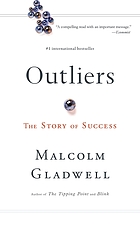
The average gamer will have spent 10,000 hours playing by the time they're 21 years old. According to Michael Gladwell in his book, Outliers, that's roughly the amount we need to become an expert in any field.

So what can all this game playing do? Dr. Jane McGonigal, a theorist and multiplayer game designer, thinks that games might save the world:

Jane McGonigal: Gaming can make a better world | Video on TED.com

I really hope that we can come together to play games that matter, to survive on this planet for another century. And that's my hope that you will join me in making and playing games like this. When I look forward to the next decade,I know two things for sure, that we can make any future we can imagine, and we can play any games we want. So, I say let the world-changing games begin.


Sound good?

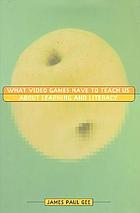
Want to get started on creating games right away?


These books and more are waiting for you at the library- game on!

Wednesday, April 1, 2009

N.pag., Medium, Italics: The New MLA and You!

It happens every ten years or so, and for thousands, their lives are never the same. No, we’re not talking about solar eclipses, the national census, or even snow in June…it’s time for a new MLA!

Just like our favorite software or fashions, the Modern Language Association ‘s (MLA) citation style has updated to reflect new resources available, as well as changing trends in humanities writing. The very first MLA guide (only one page long!) was published in 1951. Today, the Modern Language Association’s Handbook for Writers of Research Papers is 290 pages long, and covers everything from articles (a, an, the) to Yahoo!

While much of the style is the same as the 6th edition you might be familiar with—yes, papers must still be written in 12-point font with 1 inch margins rather than 18- or 20-point, sorry term paper assignees—but there have been some significant changes as well, particularly with citations for electronic formats.

Here are the highlights:
  • Italics—Chaos! Rioting in the streets! Peanut butter and pineapple on the same sandwich! Both the APA (American Psychological Association) and the MLA have managed to agree on something—all book, magazine, newspaper, website, and database titles are now italicized, not underlined.
  • Web resources (databases and open websites)—Web addresses are no longer required for citations of online resources…unless they are. The language on this requirement is particularly squishy, so here’s the direct quote:
“In the past, this handbook recommended including URLs of Web sources in works-cited-list entries. Inclusion of URLs has proved to have limited value, however… You should include a URL as supplementary information only when the reader probably cannot locate the source without it or when your instructor requires it” (182).
  • N.pag.—While this looks like it might be some trendy slang, it is actually the new abbreviation for citing items with no page numbers.
  • Medium—Is that source you’re citing a dead tree (paper) publication, or dependant on the will of the internet connection? Now all citations are to have a marker at the end indicating their publishing medium. The two big ones are “Print” and “Web” respectively.
  • Fuzzy Kitten Clause—all creators of Works Cited lists are required to spend at least 5 minutes immediately after completing their citations cuddling the cutest, fuzziest kitten they can find. If you are allergic to cats, the Handbook points out that hypo-allergenic pets make a good substitute, but iguanas are not really acceptable. Completing this task will help dispel the majority of the irritation caused by following the rest of the new style requirements. (Happy April Fool’s!)
And there you have it! If you have questions about citing a source, the librarians are here to help— feel free to drop in with any questions! For more details, check out our new handouts for the MLA style, or grab a copy of the 7th edition handbook at the UCC Library!

Friday, March 21, 2008

New Library Proxy Server: Fewer Passwords!

Great news! The UCC Information Technology Dept. has helped the Library set up a proxy server for easy off-campus access to our collection of online subscription resources. Unshackle your research from the neon-pink Library database Username/Password list-- here's how:

  1. Sign on to UCC Life.
    (Don't have a UCC Life account? If you're a UCC student, contact the Help Desk at: 440-7808)
  2. Go to the Library tab.
  3. Click on the name of the database you want to access.
It's that easy! Even better, LexisNexis Academic, C.Q. Researcher, Chronicle of Higher Education, and Encyclopedia Britannica Online are now available off-campus!

What is a "proxy server"?
It is a computer that acts as a go-between each time someone tries to contact certain sites (like our Library databases), so you don't have to login to each site individually.
A more detailed definition, from intel.com:
A proxy server is used in larger companies and organizations to improve network operations and security. It can be used to prevent direct communication between two or more networks. The proxy server forwards allowable data requests to remote servers and/or responds to data requests directly from stored remote server data.
I'm on the Library website and I still can't get into the database. Why?
You need to login to UCC Life first, and go to the database from the Library tab.
On the website, the database cannot tell if you are affiliated with UCC, but once you're signed in to UCC Life, the proxy will handle all authentication and let you "in" to the database automatically.

I click on the database name in UCC Life and wait...and wait. What's wrong?
The first time you use the proxy server in a browsing session, there may be a delay while the computers confer with each other. Just be patient; once the proxy finishes its work, every database you sign into after that should load more quickly (as long as you use the same browser window).

Can I use the usernames/passwords on my handout instead of UCC Life?
Yes. The usernames/passwords for the databases will still work from the Library website. Please note that LexisNexis, C.Q. Researcher, Chronicle of Higher Education, and Encyclopedia Britannica DO NOT allow password access; to get to these resources off-campus you MUST login through UCC Life.

I think this is awesome/awful! Who can I contact?
Your librarians always love to hear what you think about this or any of the services we offer!

Friday, February 29, 2008

Make Word 2007 write part of that term paper for you!

Did you know that Microsoft Word 2007 will create and manage Works Cited or Reference lists for you? It's true!

Here's how it works:
  1. Make sure you're using Word 2007.
    This trick will not work with earlier versions. (Sorry! Try NoodleBib or BibMe instead!)
    How do you tell you have Word 2007?
    If you open your Word program and see this button, you're using Word 2007:


  2. Go to "References" on the top horizontal menu.
    Once there, you will see "Citations & Bibliography" option at the middle top of the page:


  3. Choose your citation style from the drop-down menu.
    If you're in a Writing course, this will probably be MLA. The Nursing and Psychology programs use APA. If you're not sure, ask your instructor which they prefer.

  4. Click on "Insert Citation" to place a reference in your text.
    Let's say I have a quote:
    "The vorpal blade went snicker-snack!"

    Clicking on "Insert Citation" will bring up a window asking about my source, where I can enter the author, title, and publication information:


  5. Choose "OK" to create your in-text citation.
    "The vorpal blade went snicker-snack!" (Carroll)


  6. When you're ready to attach your "Works Cited" or "References" list at the end of the paper, choose "Bibliography."
    Word will automatically format and place your list in alphabetical order:


  7. And you're done!